I needed a GPS mount in the kayak, so I broke out my trusty printrbot and printed one.
http://www.thingiverse.com/thing:322918
Monday, May 12, 2014
Monday, February 17, 2014
Printrbot Simple
The latest thing I'm drooling over.
http://www.amazon.com/Printrbot-Simple-Printer-Filament-1-75mm/dp/B00HLSR0O8/ref=sr_1_2?ie=UTF8&qid=1392666639&sr=8-2&keywords=printrbot+simple
Monday, February 3, 2014
Making my Utii-kilt
I decided to make a kilt. I wasn't interested in a tartan and I decided on a box-pleat kilt. A knife-pleat kilt seamed like overkill. I bought some khaki duck cloth and laid it out how I thought I'd want it.
I (as usual) didn't bother with a pattern. I more or less visualized what I wanted and went from there.
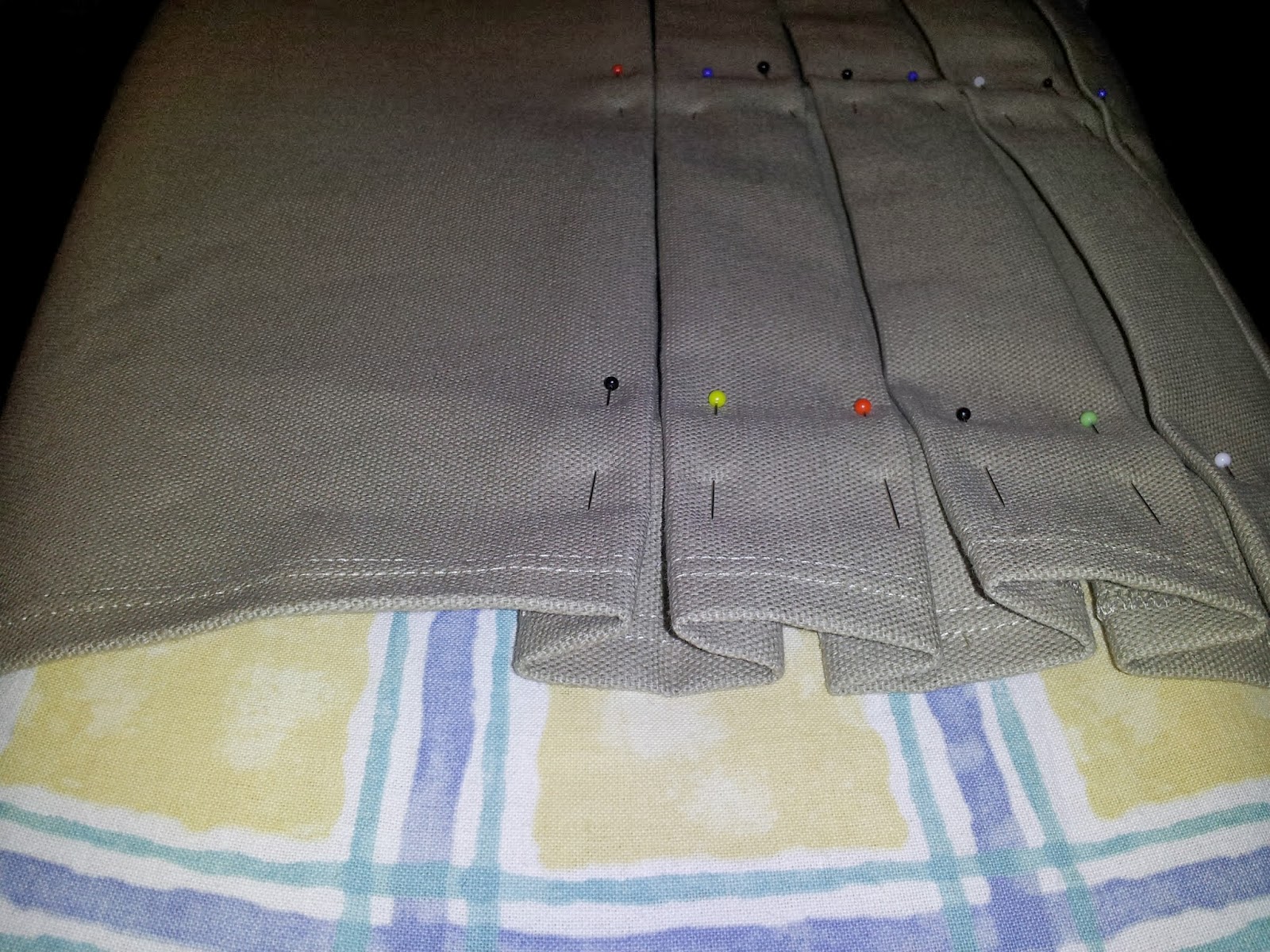
I cut the fabric leaving the selvage at the bottom. I folded it over and stitched a hem with a double needle. Then I began folding the pleats.
I assembled the front panels to the pleated back

It still needs buttons and I need to make a "sporrin", but for the most part I'm done building it.
I (as usual) didn't bother with a pattern. I more or less visualized what I wanted and went from there.
I cut the fabric leaving the selvage at the bottom. I folded it over and stitched a hem with a double needle. Then I began folding the pleats.
I finished folding the pleats. Stabbing myself at least 45 or 50 times in the fingers with pins. Great fun!
Then I sewed belt loops onto the apron part that I was going to put at the top of the pleats in the back of the kilt.
Then I attached the apron to the top of the pleats.
I sewed the front panels. I lined the inside panel so I wouldn't have the rough duck cloth rubbing against my, well, you know...
Note the lining on the inside flap below. Reduced chafing!
I'll get better pictures of me in it as soon as I can.
Folded for storage. The stitching across the pleats is to keep them intact until August. I'll pull them before I plan to wear it.

It still needs buttons and I need to make a "sporrin", but for the most part I'm done building it.
Thursday, January 30, 2014
Melted crayon art
A very cool project that came from a picture I saw on the interwebs! I'm just going to post a list of materials and the pictures. I think you can figure this one out on your own!
1 box 128 crayons
White glue
Easel pad
$14 heat gun from Harbor Freight (Many uses!)
Ta Da!
1 box 128 crayons
White glue
Easel pad
$14 heat gun from Harbor Freight (Many uses!)
Ta Da!
Emergency boot repair!
One morning while lacing up my boots, I broke the lug off the outside. It looked kinda like this one:
I needed my boots quickly!
It's been two months of daily wear since then and the repair is holding up well!
I needed my boots quickly!
- I drilled out the rivets and pulled them out of the boot from the outside. I didn't want a hole in the padding on the inside.
- Then I used my butane soldering iron to burn a circular hole behind the hole made by the rivets.
- I then shoved a small eye-bolt through the freshly burned hole and back out the rivet hole.
- The last step was to apply clear, quick setting epoxy to the base of the eye-bolt to keep it in place.
It's been two months of daily wear since then and the repair is holding up well!
Electronic uppy-downy thingy (AKA: EchoBox)
Back in August I got a height adjustable desk. It's motorized! So, one of my basic tenets is: What has motors, must be hacked! (which incidentally is NOT why my Roomba isn't working right now)
I (as usual) didn't do a great job of documenting the process. The project took shape because in order to make the desk go up and down, I would be forced to hold a button for up 17 seconds! Can you imagine the drudgery of holding in a button for 17 long, tiring seconds?
I decided to create a device with a microcontroller and a sonic module to bounce sound off of the floor and measure the distance between the desk and the floor. I started with an Ardiuno nano and a (knock-off) Ping((( module.
Then I went to Radio Shack and found the perfect case and a piece of perf board to build on.
I knew I'd need to open up the control and solder in a connector (I chose a stereo plug) to actually control the direction of travel. I got lucky. The desk's controller had three solder pads right behind the plug for the controls. Up - Ground - Down.
Then I got to experimenting with the Ping module, I came up with some code to make it work. It would simply send a trigger signal out to the trigger pin and then begin listening on the output pin.
Once that was working I just needed a way to switch the up and down controls on and off in the desk controller. I added a couple 2222 transistors to a couple digital pins and wired them up. I don't remember exactly how I did it, but I will post a schematic when I get a chance.
Next came the push buttons to select which direction the program will send the desk.
The board, when it was all wired up, was a mess, but it works!
All dressed up in it's pretty enclosure...
Mounted under the desk. The finished product.
Now, the code!
/*
echoBox
This is a sketch that controls the control box for my desk at work.
It is a motorized desk that requires you to hold the button until
it gets to the correct height.
This will allow me to program a height and press a button to get the
desk to the correct location.
*/
// set pin numbers:
#include
const int outputDn = 2;
const int outputUp = 3;
const int trigger = 6;
const int pingPin = 7;
const int buttonDn = 8;
const int buttonUp = 9;
// variables will change:
int setUpState = 0;
int setDnState = 0;
void setup() {
// initialize the pushbutton pin as an input:
pinMode(outputUp, OUTPUT);
pinMode(outputDn, OUTPUT);
pinMode(buttonUp, INPUT);
pinMode(buttonDn, INPUT);
Serial.begin(9600);
}
void loop(){
long duration, debug;
float inches;
debug = 1;
setUpState = digitalRead(buttonUp);
setDnState = digitalRead(buttonDn);
if (setDnState == LOW) {
duration = 10000;
while (duration > 2900) {
digitalWrite(outputDn, HIGH);
delay(100);
pinMode(pingPin, OUTPUT);
digitalWrite(trigger, LOW);
delayMicroseconds(2);
digitalWrite(trigger, HIGH);
delayMicroseconds(5);
digitalWrite(trigger, LOW);
pinMode(pingPin, INPUT);
duration = pulseIn(pingPin, HIGH);
inches = microsecondsToInches(duration);
if (debug = 1) {
Serial.print(inches);
Serial.print("in - ");
Serial.print(duration);
Serial.print("ms");
Serial.println();
}
}
digitalWrite(outputDn, LOW);
}
if (setUpState == LOW) {
duration = 100;
while (duration < 4650) {
digitalWrite(outputUp, HIGH);
delay(200);
pinMode(pingPin, OUTPUT);
digitalWrite(trigger, LOW);
delayMicroseconds(2);
digitalWrite(trigger, HIGH);
delayMicroseconds(5);
digitalWrite(trigger, LOW);
pinMode(pingPin, INPUT);
duration = pulseIn(pingPin, HIGH);
inches = microsecondsToInches(duration);
if (debug = 1) {
Serial.print(inches);
Serial.print("in - ");
Serial.print(duration);
Serial.print("ms");
Serial.println();
}
}
digitalWrite(outputUp, LOW);
}
}
void getHeight() {
// Add code here to do the measurement to reduce the number of lines
}
long microsecondsToInches(float microseconds)
{
return microseconds / 74 / 2;
}
I (as usual) didn't do a great job of documenting the process. The project took shape because in order to make the desk go up and down, I would be forced to hold a button for up 17 seconds! Can you imagine the drudgery of holding in a button for 17 long, tiring seconds?
I decided to create a device with a microcontroller and a sonic module to bounce sound off of the floor and measure the distance between the desk and the floor. I started with an Ardiuno nano and a (knock-off) Ping((( module.
Then I went to Radio Shack and found the perfect case and a piece of perf board to build on.
I knew I'd need to open up the control and solder in a connector (I chose a stereo plug) to actually control the direction of travel. I got lucky. The desk's controller had three solder pads right behind the plug for the controls. Up - Ground - Down.
Then I got to experimenting with the Ping module, I came up with some code to make it work. It would simply send a trigger signal out to the trigger pin and then begin listening on the output pin.
![]() |
| Yes I know the wires aren't hooked up in this picture! |
Once that was working I just needed a way to switch the up and down controls on and off in the desk controller. I added a couple 2222 transistors to a couple digital pins and wired them up. I don't remember exactly how I did it, but I will post a schematic when I get a chance.
Next came the push buttons to select which direction the program will send the desk.
![]() |
| Red for up Black for down |
The board, when it was all wired up, was a mess, but it works!
All dressed up in it's pretty enclosure...
Mounted under the desk. The finished product.
Now, the code!
/*
echoBox
This is a sketch that controls the control box for my desk at work.
It is a motorized desk that requires you to hold the button until
it gets to the correct height.
This will allow me to program a height and press a button to get the
desk to the correct location.
*/
// set pin numbers:
#include
const int outputDn = 2;
const int outputUp = 3;
const int trigger = 6;
const int pingPin = 7;
const int buttonDn = 8;
const int buttonUp = 9;
// variables will change:
int setUpState = 0;
int setDnState = 0;
void setup() {
// initialize the pushbutton pin as an input:
pinMode(outputUp, OUTPUT);
pinMode(outputDn, OUTPUT);
pinMode(buttonUp, INPUT);
pinMode(buttonDn, INPUT);
Serial.begin(9600);
}
void loop(){
long duration, debug;
float inches;
debug = 1;
setUpState = digitalRead(buttonUp);
setDnState = digitalRead(buttonDn);
if (setDnState == LOW) {
duration = 10000;
while (duration > 2900) {
digitalWrite(outputDn, HIGH);
delay(100);
pinMode(pingPin, OUTPUT);
digitalWrite(trigger, LOW);
delayMicroseconds(2);
digitalWrite(trigger, HIGH);
delayMicroseconds(5);
digitalWrite(trigger, LOW);
pinMode(pingPin, INPUT);
duration = pulseIn(pingPin, HIGH);
inches = microsecondsToInches(duration);
if (debug = 1) {
Serial.print(inches);
Serial.print("in - ");
Serial.print(duration);
Serial.print("ms");
Serial.println();
}
}
digitalWrite(outputDn, LOW);
}
if (setUpState == LOW) {
duration = 100;
while (duration < 4650) {
digitalWrite(outputUp, HIGH);
delay(200);
pinMode(pingPin, OUTPUT);
digitalWrite(trigger, LOW);
delayMicroseconds(2);
digitalWrite(trigger, HIGH);
delayMicroseconds(5);
digitalWrite(trigger, LOW);
pinMode(pingPin, INPUT);
duration = pulseIn(pingPin, HIGH);
inches = microsecondsToInches(duration);
if (debug = 1) {
Serial.print(inches);
Serial.print("in - ");
Serial.print(duration);
Serial.print("ms");
Serial.println();
}
}
digitalWrite(outputUp, LOW);
}
}
void getHeight() {
// Add code here to do the measurement to reduce the number of lines
}
long microsecondsToInches(float microseconds)
{
return microseconds / 74 / 2;
}
Thursday, June 20, 2013
Subscribe to:
Posts (Atom)